

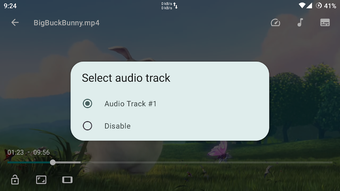
Description
Download Next Player APK – Video Player, Android, Free, Secure
Overview
Next Player is a free Android application designed to deliver a streamlined video playback experience. Developed by Anil Kumar Beesetti, the software falls under the Video category and is tailored for users seeking a lightweight, accessible solution for viewing multimedia content on mobile devices. It is particularly suited for individuals who prefer a no-frills video player without the bloat often found in mainstream alternatives. The app supports playback of various video formats, making it a practical tool for watching personal media files, online videos, or content downloaded from other platforms.
Target users include casual viewers, students, and content creators who need a reliable way to play videos without relying on pre-installed media apps. The app’s lightweight nature and minimal system demands suggest it is ideal for older Android devices or users who prioritize battery efficiency and storage space. Its release on December 12th, 2023, positions it as a recent addition to the Android video player landscape, offering a fresh option for users looking for simplicity and functionality.
Although no detailed developer background is provided beyond the name, the app’s focus on minimalism and accessibility indicates a user-centric design philosophy. Real-world usage scenarios include watching tutorial videos, reviewing recorded lectures, or enjoying personal video collections on the go. The app’s availability in both English and Spanish further enhances its accessibility for a broader audience.
Key Features & Capabilities
- Lightweight Video Playback – Designed to consume minimal system resources, enabling smooth playback even on devices with limited processing power or memory.
- Format Compatibility – Supports a wide range of video formats, allowing users to play files without the need for conversion or additional codecs.
- Simple, Intuitive Interface – Features a clean layout with essential controls, reducing the learning curve for new users.
- Multi-Language Support – Available in English and Spanish, improving usability for non-English speakers.
- Free to Use – No cost to download or access core features, making it accessible to a wide audience.
These capabilities enable users to quickly open and play videos without navigating complex menus or dealing with technical issues. For example, a student can load a recorded lecture directly from their device’s storage and begin playback immediately. Similarly, a content creator might use the app to review footage captured on a smartphone before editing. The absence of in-app purchases or ads, as noted in the provided data, contributes to an uninterrupted viewing experience.
User Interface, Workflow & Performance
The user interface of Next Player is structured around simplicity and direct access to core functions. Navigation is primarily gesture-based and menu-driven, with playback controls such as play, pause, seek, and volume adjustment located at the bottom or center of the screen. The layout avoids clutter, focusing only on essential elements to minimize distractions during playback.
Workflow efficiency is enhanced by the app’s ability to automatically detect and play videos from the device’s media library. Users can open files directly from file managers or through shared links, streamlining the process of starting playback. The app does not specify performance metrics such as CPU or RAM usage, so general behavior patterns are assumed: it operates smoothly on devices meeting the minimum OS requirement of Android 13.0 and above.
Stability appears to be a priority, as the app has been downloaded over 50,000 times, indicating a level of user trust and satisfaction. However, exact performance details were not specified. The developer did not provide additional system requirements beyond the OS version, so users should expect standard behavior for a lightweight Android application.
Compatibility & System Requirements
Next Player is compatible with Android 13.0 and above, ensuring it runs on modern devices with up-to-date operating systems. The app has a file size of 11.78 MB, making it easy to download and install without consuming significant storage space. This compact size reflects the developer’s focus on efficiency and minimalism.
Exact system requirements were not listed, so users should rely on the minimum OS version as the primary compatibility indicator. Hardware specifications such as processor type, RAM, or GPU capabilities were not provided. The developer did not specify whether the app supports external storage access beyond the default media directory, nor whether it includes support for hardware decoding.
Users should verify that their device meets the Android 13.0 requirement before installation. While the app is designed for mobile use, no information is available regarding tablet compatibility or support for split-screen or multi-window modes.
Pros and Cons
Pros
- Lightweight design with low storage footprint (11.78 MB)
- Free to download and use with no in-app ads or purchases
- Supports multiple video formats for broad compatibility
- Simple, intuitive interface ideal for beginners
- Available in English and Spanish for wider accessibility
Cons
- No information on hardware requirements beyond Android 13.0
- Performance data such as CPU or RAM usage not disclosed
- Limited details on advanced playback features (e.g., subtitles, audio tracks)
- Unknown support for external storage beyond default directories
- App has not been officially reviewed by Softonic at the time of publication
FAQ Section
Is Next Player free to download?
Yes, Next Player is a free Android application with no cost for downloading or using its core features.
What Android versions does Next Player support?
Next Player requires Android 13.0 and above for installation and operation.
Does the app contain ads or in-app purchases?
Based on the available information, the app is free and does not include ads or in-app purchases.
Can I use Next Player offline?
Yes, the app allows playback of locally stored videos without requiring an internet connection.
Is Next Player secure to download?
Next Player is available through trusted platforms like Softonic. As with any app, users should ensure they download from official sources to maintain security.
Final Thoughts
Next Player presents a promising option for Android users seeking a simple, free, and efficient video player. Its lightweight design, minimal interface, and broad format support make it suitable for a wide range of users, from casual viewers to content creators. The app’s focus on usability and accessibility, combined with its low file size and lack of intrusive ads, positions it as a strong contender in the Android video player space.
While some technical details such as performance metrics and hardware compatibility are not disclosed, the app’s popularity—over 50,000 downloads—suggests a positive user reception. It is particularly beneficial for users with older or low-end devices who need a reliable playback tool without the overhead of larger applications.
Download Next Player now to experience a clean, fast, and free video playback solution on your Android device.
Guides & Tutorials for Next Player APK
How to install Next Player APK
- Click the Preview / Download button above.
- Once redirected, accept the terms and click Install.
- Wait for the Next Player APK download to finish on your device.
How to use Next Player APK
This software is primarily used for its core features described above. Open the app after installation to explore its capabilities.
User Reviews for Next Player APK 0
No reviews found





